AdsforIndians

AdsforIndians

Showing posts with label Unigraphics. Show all posts

Thursday, 9 August 2012

Download Full version of Unigraphics NX 6 100% Free

UGS NX is the commercial CAD/CAM/CAE PLM software suite developed by Siemens UGS PLM Software. NX is widely used throughout the engineering industry, especially in the automotive (e.g., General Motors, Nissan Motors) and aerospace sectors (e.g., Boeing, Rolls-Royce and Pratt & Whitney). It is also used in consumer goods design in companies such as BSH, Dyson, and Apple.


Download link for Unigraphics.Nx6.0.0.24.Win32

http://www.missupload.com/zd1458/530/Unigraphics%20Nx%206.0.0.24.Win32%20Download%20(Full%20&%20Crack)

Wednesday, 8 August 2012

ENVIRONMENT VARIABLE and Port Value Problem Solution

Hi Friends,


Here i am getting 2 or 3 mails daily regarding the problem of ENVIRONMENT VARIABLE and port value in UG NX Series (Unigraphics).


If any of you got errors listed below, than you are at right place and found solution.


Errors:


log file in UGSLicensing saying that it could not open the port listed in the license file.

NX LICENSE ERROR - NX REQUIRED THE ENVIRONMENT VARIABLE ugs_LICENSE_SERVER to be configured properly.

The TCP port number in the license, 28000, is already in use.

FLEXnet Licensing error:-125,147


so friends there is two solutions, one for UG NX 1-4 and Second for UG NX 5-6,


For UG NX 1-4 :


right click on My Computer ->Properties-> advance tab -> environment variables.

click on new tab


in variable name write ------UGII_LICENSE_FILE


in variable values write -----27000@COMPUTER Name


For UG NX 5-6 :


right click on My Computer ->Properties-> advance tab -> environment variables.

click on new tab


in variable name write ------UGS_LICENSE_SERVER


in variable values write -----28000@COMPUTER Name


See the print screen below :


License Server not Found Error Solution for UG NX Series

Hello Dear All,


Again here i got mails from the blog readers having problems in installation of Unigraphics,Ansys,Pro Engineer etc.


During installation we need to configure License File via. License server installed in our Personal Computer(PC) or Laptop.


I have already posted the step by step procedure for License file Configuration here.


But either by user mistake or via improper method some of users will get the errors, that License Server not Found during configuration via lmtools.exe


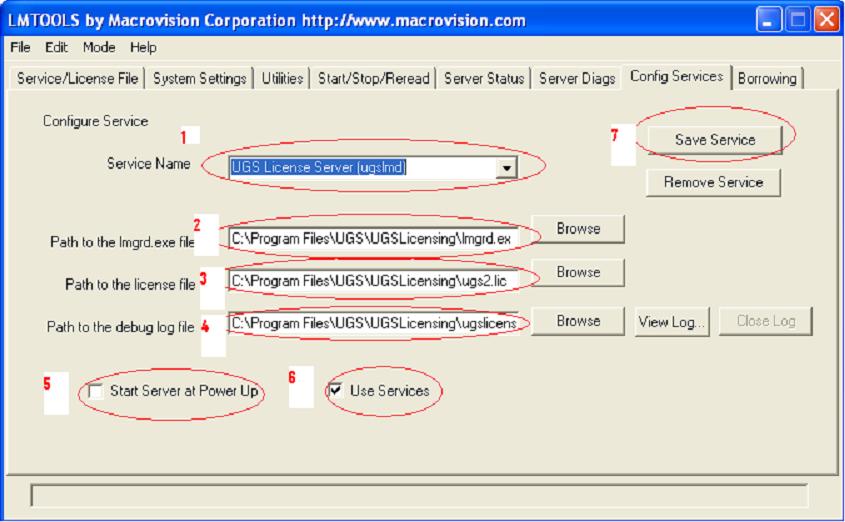
So here I am posting solution for that, open lmtools.exe that will show you the following image.


At step (A) Here in this image the UGS License Server is running properly (B)


if in yours this is not, then go to step (C) and create and save a new license server.

1. Here you will see the Service Name: UGS License Server (ugslmd)


2. Click on browse and select the file lmgrd.exe in your PC : C:\Program Files\UGS\UGSLicensing\lmgrd.exe


3. Click on browse and select the license file in your PC : C:\Program Files\UGS\UGSLicensing\ugs2.lic


4. Click on browse and select the debug log file in your PC : C:\Program Files\UGS\UGSLicensing\ugslicensing.log


If debug log file is not there then create a text document and rename it with ugslicensing.log


5. Enable (Check mark) Start server at Power Up.


6. Use services same as shown.


7. Click Save Service.Then restart the Computer and run lmtools.exe, check the status at (B) you will get UGS License Server.


Then go to my other post and configure license file via this UGS License Server.


For configuration in UG NX5 and UG NX6 click here


For configuration in UG NX4 to NX1 click here


Now enjoy and You can use the same procedure in Ansys or Pro Engineer or any other software which is using Lmtools license.

UG license server error in UG NX5 and NX6

Hi Friends,


One of my friends got this problem in UG license server, and asked me solution.


I am trying to install UGnx5 I keep getting the error can you help me?


Initialization error-

NX License Error: License Server node is down or not responding [-96]


What can I do? I set my environment variables to


variable name UGII_LICENSE_FILE

variable value 27000@dgkw5f64


this is in my peform enquiry


[Detecting lmgrd processes...]

License server status: 27000@DGKW5F64.

License file(s) on DGWW8F61.: C:\Program Files\UGS\NX 4.0\UGFLEXLM\ugnx4.lic:


DGWW8F61.: license server UP (MASTER) v10.8


Vendor daemon status (on DGKW5F64.):


uglmd: UP v10.


this also


FLEXnet Licensing error:-125,147


So friend here is solution for this.......

use env. variable like this in UG NX5 and NX6. Because the port value is changed 28000 from 27000.


variable name : UGII_LICENSE_SERVER


variable value : 28000@Computer Name


and rest license cofiguration process is same as in previous versions of UG.

For configuration process check my post


UG-license-installation-error-solution

Unigraphics Hot keys to increase user performance

Hi dear all,


Sometimes you can work faster with your personal computer or laptop key-board then the mouse if you know the short cut keys. Same as in the other programs CAD software's also have their hot keys. Here are the hot keys or you can say key-board short cut keys of unigraphics (UG). Hope that this will help a lot to improve your software understanding and working.


Edit-Undo List-Invalid menu entry Ctrl+Z UG_EDIT_UNDO

Edit-Cut Ctrl+X UG_EDIT_CUT

Edit-Copy Ctrl+C UG_EDIT_COPY

Edit-Paste Ctrl+V UG_EDIT_PASTE

Edit-Delete... Ctrl+D UG_EDIT_DELETE

Edit-Selection-Top Selection Priority - Feature F UG_SEL_FEATURE_PRIORITY

Edit-Selection-Top Selection Priority - Face G UG_SEL_FACE_PRIORITY

Edit-Selection-Top Selection Priority - Body B UG_SEL_BODY_PRIORITY

Edit-Selection-Top Selection Priority - Edge E UG_SEL_EDGE_PRIORITY

Edit-Selection-Top Selection Priority - Component C UG_SEL_COMPONENT_PRIORITY

Edit-Selection-Select All Ctrl+A UG_SEL_SELECT_ALL

Edit-Blank-Blank... Ctrl+B UG_EDIT_BLANK_SELECTED

Edit-Blank-Reverse Blank All Ctrl+Shift+B UG_EDIT_REVERSE_BLANK_ALL

Edit-Blank-Unblank Selected... Ctrl+Shift+K UG_EDIT_UNBLANK_SELECTED

Edit-Blank-Unblank All of Part Ctrl+Shift+U UG_EDIT_UNBLANK_ALL_OF_PART

Edit-Transform... Ctrl+T UG_EDIT_TRANSFORM

Edit-Object Display... Ctrl+J UG_EDIT_OBJECT_DISPLAY

View-Operation-Zoom... Ctrl+Shift+Z UG_VIEW_ZOOM

View-Operation-Rotate... Ctrl+R UG_VIEW_ROTATE

View-Operation-Section... Ctrl+H UG_VIEW_SECTIONING

View-Layout-New... Ctrl+Shift+N UG_LAYOUT_NEW

View-Layout-Open... Ctrl+Shift+O UG_LAYOUT_OPEN

View-Layout-Fit All Views Ctrl+Shift+F UG_LAYOUT_FIT_ALL_VIEWS

View-Visualization-High Quality Image Ctrl+Shift+H UG_VIEW_HIGH_QUALITY_IMAGE

View-Information Window F4 UG_VIEW_INFO_WINDOW

View-Current Dialog F3 UG_VIEW_CURRENT_DIALOG

View-Reset Orientation Ctrl+F8 UG_VIEW_RESET_ORIENTATION

Format-Layer Settings... Ctrl+L UG_LAYER_SETTINGS

Format-Visible in View... Ctrl+Shift+V UG_LAYER_VIEW

Format-WCS-Display W UG_WCS_DISPLAY

File-New... Ctrl+N UG_FILE_NEW

File-Open... Ctrl+O UG_FILE_OPEN

File-Save Ctrl+S UG_FILE_SAVE_PART

File-Save As... Ctrl+Shift+A UG_FILE_SAVE_AS

File-Plot... Ctrl+P UG_FILE_PLOT

File-Execute-Grip... Ctrl+G UG_FILE_RUN_GRIP

File-Execute-Debug Grip... Ctrl+Shift+G UG_FILE_RUN_GRIP_DEBUG

File-Execute-NX Open... Ctrl+U UG_FILE_RUN_UFUN

Tools-Expression... Ctrl+E UG_INSERT_DLEXPRESSION

Tools-Journal-Play... Alt+F8 UG_JOURNAL_PLAY

Tools-Journal-Edit Alt+F11 UG_JOURNAL_EDIT

Tools-Macro-Start Record... Ctrl+Shift+R UG_MACRO_RECORD

Tools-Macro-Playback... Ctrl+Shift+P UG_MACRO_PLAYBACK

Tools-Macro-Step... Ctrl+Shift+S UG_MACRO_STEP

Preferences-Object... Ctrl+Shift+J UG_PREFERENCES_OBJECT

Preferences-Selection... Ctrl+Shift+T UG_PREFERENCES_SELECTION

Information-Object... Ctrl+I UG_INFO_OBJECT

Analysis-Curve-Refresh Curvature Graphs Ctrl+Shift+C UG_INFO_MB_SHOW_GRAPHS

Application-Modeling... Ctrl+M UG_APP_MODELING

Application-Shape Studio... Ctrl+Alt+S UG_APP_STUDIO

Application-Drafting... Ctrl+Shift+D UG_APP_DRAFTING

Application-Manufacturing... Ctrl+Alt+M UG_APP_MANUFACTURING

Application-Sheet Metal-NX Sheet Metal Ctrl+Alt+N UG_APP_SBSM

Application-Gateway... Ctrl+W UG_APP_GATEWAY

Help-On Context... F1 UG_HELP_ON_CONTEXT


If you have any suggestion or feedback, then let us know.

Unigraphics Hot keys to increase user performance

Hi dear all,


Sometimes you can work faster with your personal computer or laptop key-board then the mouse if you know the short cut keys. Same as in the other programs CAD software's also have their hot keys. Here are the hot keys or you can say key-board short cut keys of unigraphics (UG). Hope that this will help a lot to improve your software understanding and working.


Edit-Undo List-Invalid menu entry Ctrl+Z UG_EDIT_UNDO

Edit-Cut Ctrl+X UG_EDIT_CUT

Edit-Copy Ctrl+C UG_EDIT_COPY

Edit-Paste Ctrl+V UG_EDIT_PASTE

Edit-Delete... Ctrl+D UG_EDIT_DELETE

Edit-Selection-Top Selection Priority - Feature F UG_SEL_FEATURE_PRIORITY

Edit-Selection-Top Selection Priority - Face G UG_SEL_FACE_PRIORITY

Edit-Selection-Top Selection Priority - Body B UG_SEL_BODY_PRIORITY

Edit-Selection-Top Selection Priority - Edge E UG_SEL_EDGE_PRIORITY

Edit-Selection-Top Selection Priority - Component C UG_SEL_COMPONENT_PRIORITY

Edit-Selection-Select All Ctrl+A UG_SEL_SELECT_ALL

Edit-Blank-Blank... Ctrl+B UG_EDIT_BLANK_SELECTED

Edit-Blank-Reverse Blank All Ctrl+Shift+B UG_EDIT_REVERSE_BLANK_ALL

Edit-Blank-Unblank Selected... Ctrl+Shift+K UG_EDIT_UNBLANK_SELECTED

Edit-Blank-Unblank All of Part Ctrl+Shift+U UG_EDIT_UNBLANK_ALL_OF_PART

Edit-Transform... Ctrl+T UG_EDIT_TRANSFORM

Edit-Object Display... Ctrl+J UG_EDIT_OBJECT_DISPLAY

View-Operation-Zoom... Ctrl+Shift+Z UG_VIEW_ZOOM

View-Operation-Rotate... Ctrl+R UG_VIEW_ROTATE

View-Operation-Section... Ctrl+H UG_VIEW_SECTIONING

View-Layout-New... Ctrl+Shift+N UG_LAYOUT_NEW

View-Layout-Open... Ctrl+Shift+O UG_LAYOUT_OPEN

View-Layout-Fit All Views Ctrl+Shift+F UG_LAYOUT_FIT_ALL_VIEWS

View-Visualization-High Quality Image Ctrl+Shift+H UG_VIEW_HIGH_QUALITY_IMAGE

View-Information Window F4 UG_VIEW_INFO_WINDOW

View-Current Dialog F3 UG_VIEW_CURRENT_DIALOG

View-Reset Orientation Ctrl+F8 UG_VIEW_RESET_ORIENTATION

Format-Layer Settings... Ctrl+L UG_LAYER_SETTINGS

Format-Visible in View... Ctrl+Shift+V UG_LAYER_VIEW

Format-WCS-Display W UG_WCS_DISPLAY

File-New... Ctrl+N UG_FILE_NEW

File-Open... Ctrl+O UG_FILE_OPEN

File-Save Ctrl+S UG_FILE_SAVE_PART

File-Save As... Ctrl+Shift+A UG_FILE_SAVE_AS

File-Plot... Ctrl+P UG_FILE_PLOT

File-Execute-Grip... Ctrl+G UG_FILE_RUN_GRIP

File-Execute-Debug Grip... Ctrl+Shift+G UG_FILE_RUN_GRIP_DEBUG

File-Execute-NX Open... Ctrl+U UG_FILE_RUN_UFUN

Tools-Expression... Ctrl+E UG_INSERT_DLEXPRESSION

Tools-Journal-Play... Alt+F8 UG_JOURNAL_PLAY

Tools-Journal-Edit Alt+F11 UG_JOURNAL_EDIT

Tools-Macro-Start Record... Ctrl+Shift+R UG_MACRO_RECORD

Tools-Macro-Playback... Ctrl+Shift+P UG_MACRO_PLAYBACK

Tools-Macro-Step... Ctrl+Shift+S UG_MACRO_STEP

Preferences-Object... Ctrl+Shift+J UG_PREFERENCES_OBJECT

Preferences-Selection... Ctrl+Shift+T UG_PREFERENCES_SELECTION

Information-Object... Ctrl+I UG_INFO_OBJECT

Analysis-Curve-Refresh Curvature Graphs Ctrl+Shift+C UG_INFO_MB_SHOW_GRAPHS

Application-Modeling... Ctrl+M UG_APP_MODELING

Application-Shape Studio... Ctrl+Alt+S UG_APP_STUDIO

Application-Drafting... Ctrl+Shift+D UG_APP_DRAFTING

Application-Manufacturing... Ctrl+Alt+M UG_APP_MANUFACTURING

Application-Sheet Metal-NX Sheet Metal Ctrl+Alt+N UG_APP_SBSM

Application-Gateway... Ctrl+W UG_APP_GATEWAY

Help-On Context... F1 UG_HELP_ON_CONTEXT


If you have any suggestion or feedback, then let us know.